Monday, July 30, 2018

Photoshop Selection Tool Lesson


Save your favorite destination spot!

Save directly from this site using the following steps...
1. Right click image
2. Save Image As...
3. Open from desktop in Photoshop

OR

Click here to download directly from Dropbox


Then choose your new background! 


Saturday, May 3, 2014

Life Back Home


These posts have been a long time coming, but I've finally found three seconds in the crazy schedule to sit down and type!

It's been one year since being back from England, I have found myself saying YES to every opportunity that comes my way. It is very liberating living this way, but also exhausting! 

After completing my dissertation on "The benefits of social networking in the classroom: Flickr in the art room" and PASSING, I moved into the "real life: more work, less naps" stage of life...

While re-adjusting to being back home, I've accepted some jobs including
  • Head coach for high school varsity volleyball team
  • Head coach for travel club volleyball team
  • Substitute teacher
  • Visual coordinator at local yoga studio
  • Art Consultant at a nursing home
  • Art Director for summer camp
  • Head coach for NCAA DIII Volleyball team
So yes, things have been a little crazy, but are looking up. 

Message to all my supporters: keep your fingers crossed I can land a full time art teaching position soon!!


"Fortune favors the bold"

More to come...

Friday, December 28, 2012

First School Visit: Durham Johnston

I made my first school visit to secondary school, Durham Johnston.


Upon arrival, I was shown around the school with two students from Ms. Browns class. They took us on a tour and my first thought was "WOW!" The sheer size of the shool was amazing. The school was just three years old so everything was fresh and clean still. The rooms were built for specific purposes. There were 3 computer labs, a cooking room, sewing room, 3 art rooms with a darm room, studio space, and laptops for students to add. Each room was equipped with a smartboard and books for students.
Students were not expected to bring books to and from class. Things were left in cabinet in the classroom so the teacher could grade work, and students can have everythign back the next day class was in session.
I thought this was a great system. Students would never be unprepared for class.

When I saw the number of artrooms I was extremely excited. I wanted to hang out in there all day. Because the school is funded by the government, there is no worry about not having enough budget for the art supplies. Students were working on 5x5 ft canvas oil paintings. And may I say, in the number of schools I've observed, the work done by the students in this school was exceptional.
After speaking with one of the teachers, she had said the students have won national awards based on their paintings and charcoal work.
I can say their work inspired me to buy myself some supplies here and get to creating!!

I am sure I will be heading back to this school to investigate and observe some of her classes. I definitely appreciate coming across a great, inspiring, art teacher :)

SynergyNet Project

During one of my first classes I learned about this really cool system in some English classes.
It's called the SynergyNet Project. A professor at Durham has been researching this concept of a Multi Touch room.
Students are set up at multiple tables throughout the classroom. It is in a sense, I giant ipad. Students are able to search for content, move things around for easier understanding. There is also interaction between tables. Students can fling an image or piece of information from their table, to their neighbors.

The teacher has a smartboard up front that connects to all of the tables. When they want to bring focus to one tables information, they can pull up an image of the table at the moment. Everyones tables freeze and students are sent in another direction for the project at hand.

VERY COOL!

Students are greatly attracted to this kind of product. Just imagine a child with a regular ipad in front of them, they love it. This is bigger, better, and everyone has one and can interact at the same time.

 If you want to check out more information, click here.

New Adventures in Education: England

After graduating from SUNY New Paltz, I decided to continue my education and go out to get my masters! What better way to do this, than go to Durham University in Durham, England!


I flew out in September and have been here for four months. I am playing volleyball for the University as well. Everything is a bit slower, people are much more patient.  They may speak English, but the classes and way of living here is definitely different.
Instead of taking multiple 3 credit courses, I am taking 5 modules.

These include:
Dissertation- pretty much my thesis
Research Methods- Prepping and ways of researching for your dissertation
Arts in Education- Super excited about this class! Can't way to see the different ways students are taught in the art room.
Special Education Needs (SEN)- Course directed towards special needs students and how to work with them in the classroom.
21st Century Technology- I'm hoping this course assists me while I am trying to figure out what my dissertation is going to be focused on... It should be cool though, learning about the technology England offers

The way modules run is very different. You are expected to take 24 hours of class, spread out over a month or so, or just a weekend based on the type of class it is. When you complete the main portion of the class, you have a summative assignment which is 15 pages long and argues a point or subject from the class. That's it. No test, no class participation. Just one essay that decides your grade for the class.
The dissertation is the largest focus though, that takes the most time. You are expected to have a research topic and conduct research to aid your paper. It is 43 pages long.... That'll be fun...when I get to it.

Should be interesting! I'll be keeping track of my dissertation on here most likely. My main idea is covering the concept of using social media in the classroom.. if anyone has any info, feel free to share!

Monday, November 19, 2012

Student Teaching Part 2: Gayhead Elementary School


After leaving a wonderful experience at the New Paltz Middle School, I thought my only direction for my next placement could go was down. Little did I know, Mrs. Robinson, the elementary schools art teacher was also an amazing mentor. I learned so much from her as a teacher and peer in the school. Her classroom was extremely organized and displayed all the students work. She had a great relationship with the students and new extremely well where to draw the line between friend and educator.
I hung around the room for a week or so, getting the hang of the way she taught and what the students reacted well to. She had many techniques I took notes on and wanted to incorporate into my teaching style. While I waited, I developed lesson plans and projects.
The projects I did with the students included:

1st grade
Van Gogh Trees- this project may have been a little better for a higher age level, second or third grade. Students had a hard time connecting paintbrush to paper. But, the end results were so cute! Students learned A LOT of techniques and names of styles in this lesson. After reading Sky Tree, by Thomas Locker, students were asked to make their own tree and use color schemes for a particular season.


2nd grade
The Big Orange Splot- The introduction for this lesson icluded a class book reading of "The Big Orange Splot." Students then learned how to mix paint to create the color orange. They then created their own ink blot and had to decide what they saw in the image! Very cool. They were asked to draw on top of the dried paint and recreate whatever they had imagined the splot to be. We spoke about contrasting colors and negative space. Each student also wrote the story of what they saw in their big orange splot.


3rd grade
Texture Boxes- After I dressed myself up as Louis Nevelson to introduce this lesson, students learned about Nevelson as an artist and what texture was. They were asked to make their own texture boxes that would create an installation when combined with classmates work. Thank goodness my mentor teacher had tons of materials for this! We used laundry detergent caps, wood, buttons, straws, tissue paper, pinecones..  When students finished their boxes I brought them all outside and spray painted them according to class. This class came back and saw their pieces all gold! The reactions were extremely rewarding and they kids loved to see their work together. They conducted a quick write up about texture, what they see in other students boxes and what they learned from the lesson. This was on display in the hallways and students recieved MANY complements on the lesson. It was abstract but eye grabbing!
4th grade
Nature Books- Students in these classes learned how to create an accordian book and what drawing from observation meant. They were asked to explore outside for interesting materials that they can bring into the classrom. After gathering supplies from outside, they came back and explored the art materials such as painting, watercolor, printing, and drawing.


5th grade
Calder Balloons- This project was definitely a bit of a challenge for this age group. I would love to try it again with 7th graders and see if it was a bit more productive. The main goal for this project was to learn about artist Alexander Calder and create hollow balloon like structures with facial expressions. Using balloons, students wrapped glue-y yarn around the balloon. The base was a primary color and once dried, yarn was again applied to create a loopy facial expression that the student chose in black. Students at this age seemed to have an extremely hard time working the motor skills to control the balloon. After a first failed attempt, I made the balloons smaller. This worked a bit better, but even then students had a hard time keeping the yarn tight from falling off the balloon. Again, an older group would have had a bit of an easier time with this project. In the end, I finished the base for some balloons that had no hope. Students created the face on top and the next day in class, they showed up to their spheres hanging in the front of the room.


This was as well a marvelous experience. I spoke a lot with Mrs. Robinson outside of the classes about how I can improve my teaching and communication with the students. She gave me a ton of feedback for growth and expanding. I would hope to go back one day to see the classes and school again. I greatly enjoyed my experiences student teaching and I often reminisce about how great it was!

Thursday, November 15, 2012

Student Teaching Part 1: New Paltz Middle School

After sitting back and rethinking my experiences student teaching, I've decided to get back into the swing of things and post my experiences to share with you. I began my first placement at the New Paltz Middle School with Kim Sturgis. This was an amazing experience. Because I was at this school for my internship, it was an easy transition into teaching the students straight away.

Many say middle schools contain students at "the worst age level" and it is the most frustrating to teach. But I have to say I think I enjoyed it the most. Students are at the age where they are learning about themselves and experiencing new things. I feel this is the age where good teachers are most crucial. I found students respected me as a teacher because I did not try to speak at them rather with them. I found many students felt comfortable speaking with me after class. I also tried to direct my lessons to things students find interesting or are experiencing at this time in their lives. This was helpful for them and myself because students were engaged in the projects.

My lessons in the middle school included :
6th grade
Clay amulets
·      Historical and Cultural introduction to Amulets and good luck charms
·      Jewelry making: Use of wire, beads, hemp to create finished jewelry piece

·      Ceramics: Use of earthenware clay and glaze to create amulet

Doodle for Google
 This years theme was to create a doodle for google "If I could travel anywhere in time, I would go..." Students were asked to create a well thought out doodle and 50 word write up based on their design. End results were great!

7th grade
Word Locker Project- This project was introduced by my mentor teacher and I assisted in the final stages to complete the project. This created an easy transition into the next project
Facebook Project- This was an amazing experience to have while teaching. I introduced social media into the art room. Students needed to create a Facebook for an American Artist. The students had a requirement to learn about an artist. As requested, my teacher asked me to think of a way students can learn from eachother. What better way than introducing something the students may already do at home. I created a template and the students simply had to do the research and plug in the information found. It was a fun and exciting way to change the learning style.

Results were great! Trust me! I am still in the process of figuring out how to post these end products...

8th grade
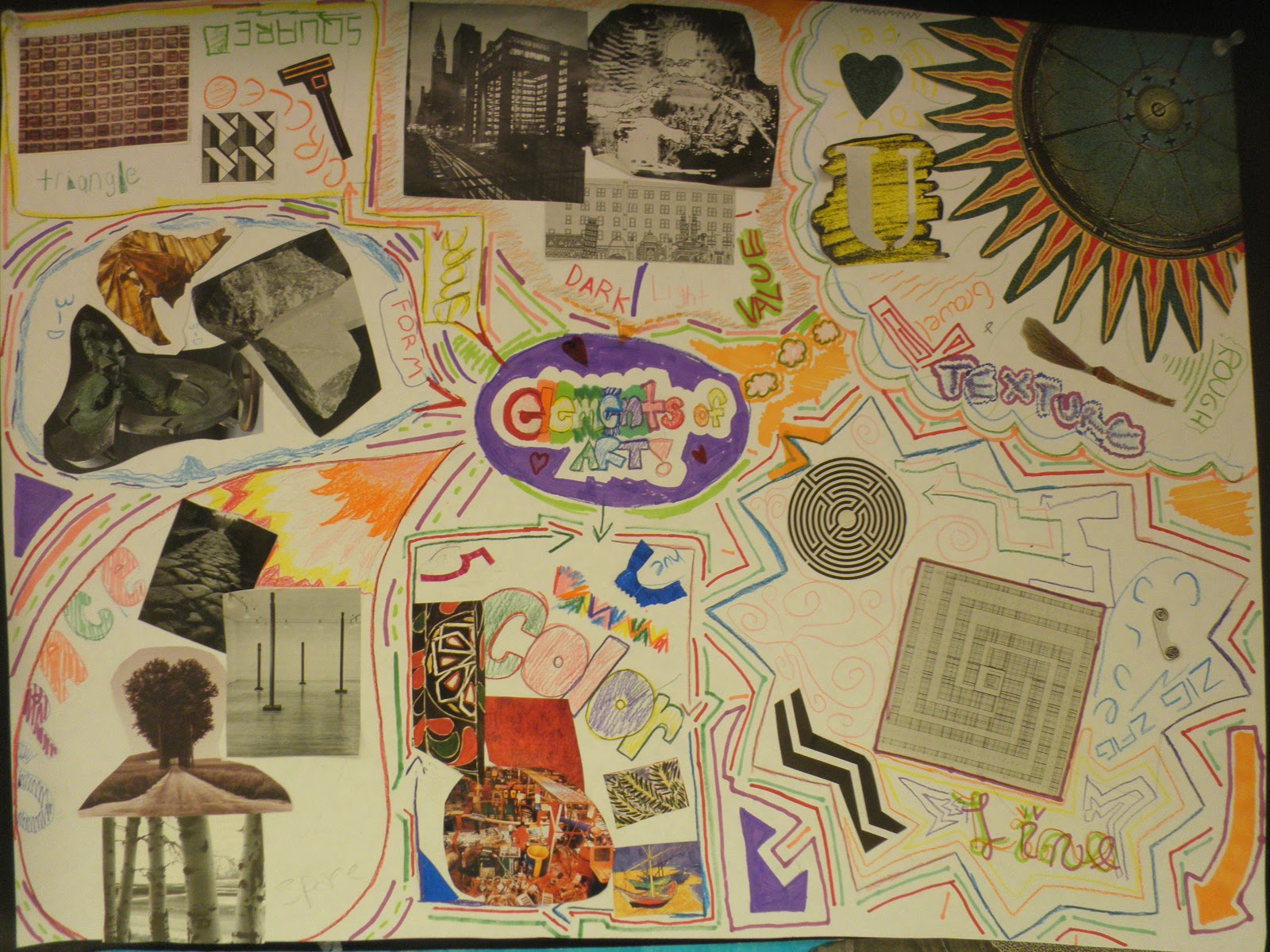
Elements of Art Project- This was a requirement for the class, for the students to learn about the Elements of art before the leave for high school. I turned this into a group project, students made a poster that would be displayed in the front of the classroom describing the Elements of Art.


Sell That Logo Project- A quick transition from the Elements of Art Project, students were in groups and had to create a logo for a company based on their needs and the situation at hand.  Students liked this project because we used companies that were in their own town. Companies they knew and went to every day!


Grafitti Project- 
Students will create stencils expressing concerns of change within their school and community through a collaborative graffiti work by using spraypaint and printmaking techniques. Students had a hard time with the stencil concept but once they practiced and worked with the exacto knives they began enjoying the project and idea of  "grafitti"ing the school.


I also was able to help with the set of the schools play, Mulan. I worked side by side with the students creating backdrops, decorations, and more. This was extremely beneficial for me because I was able to allow students from my class to stay after school to work on their projects. I often had a full class of students working outside of their art class. This is the kind of environment I'd like to create in my own classroom. The art room is somewhere students can be free to explore materials, be comfortable in school, and learn about themselves as they grow up.

Overall, I had an extremely positive experience at the New Paltz Middle School. I will forever think of Kim Sturgis and the students at the school as a group that has impacted my life. The school had an amazing sense of community where the students spoke with the teachers, educators were always watching hallways making sure students were safe and respecting eachother.

Sunday, December 18, 2011

The Bullying Project Take Two

After rounding out the last days at New Paltz Middle School, Taylor and I ended up with some stellar final projects from the students.
Again as a reminder from one of my last posts "The Bullying Project" we created a lesson plan based around bullying. We showed videos and collected secrets students had involving bullying. We had high hopes for the projects, students were very motivated and excited to participate in. After reading some of the secrets, things came to a halt and were redirected. We found some secrets students wrote that were a little too sensitive to share to the class. Leading us to turn the project into a more positive light. The next time we came back to the class we had students remember their original secret and create a solution or resolution to the problem. They could also focus on what an ally was.
Within this change, the projects also shifted.
6th grade- Create slogans and images to stop bullying which will be turned into iron-ons for t-shirts. The best in each class will be combined to create a peace sign, printed onto shirts to be sold to the school.

7th grade- Students create a wordle poster adding words that represent allies and what they are. The posters were laminated and placed throughout the school in areas where students thought bullying happens
 

 8th Grade- Students produced creative videos in which they worked in groups or alone to edit to their liking, adding statistics and quotes, music and sound.

I can't show you the videos due to the fact that I can't put these kids pictures up online! You'll just have to take my word for it, they came out great!

Sunday, November 27, 2011

Sell That Logo

Taylor and I taught our lesson "Sell That Logo" to the class on the Tuesday before break. I think it went very well. We spent a lot of time prepping for the class, making sure the flow and transitions would be smooth and simple for the class to understand. We had a lot of information that needed to be told to the students, so any time taken for making groups and getting materials would put us behind. As the students entered the room, there was a sign that instructed them to check out our bulletin board.
This allowed the students to come into the classroom and have an idea of what the project would entail. After they checked out the bulletin board, students were handed a post it with a number, they had to sit at the labeled table with their corresponding number. This was a quick and effective way for students to be placed into groups from the get go and saved us 5 minutes!

When students were seated and the class began, Ms. Henshaw and I showed a slide show that had many different logos and advertisements. We had the class comment on logos they knew and why some advertisements would draw you in more than others. We also spoke about recontextualizing symbols. How these signs we normally see in one place are placed somewhere else.
Somehow along the way, we forgot to maximize our slide show and we found some students were distracted from the main point of our presentation. Next time I use this lesson, I will be sure to use the full screen. After speaking about logos, we brought up the topic of teams and if anyone was on a team. We asked what kind and if there were any different teams people could be a part of, what it means to be part of a team and how to have a successful team. After this class conversation, we informed everyone about a design team, and that where they are seated will be their design team. I think students found this an interesting way to group people together, everyone seemed to be smiling when they looked around at who was in their group. In the back of the room we created posters that described the jobs
Graphic Designer: in charge of final image chosen
Editor: in charge of final words or letters chosen
Team Manager: in charge of keeping the team on track
Project Manager: in charge of presenting logo to class
After presenting these jobs and responsibilities, the groups were handed index cards and had to decide who would be in charge of which job. I think we could have left room for questions if the class had any, instead of rushing into the next step. But the class seemed to catch on to what they were asked of. From here, we went into a class demo.  We had all of our materials and slogans cut out and ready for the class to see, saving us time for the students to work.

By simply explaining how we explored through text, color, and shapes, the class quickly saw how they could experiment with their scenarios. We showed a couple more examples that were already created


There was mostly positive feedback about this demo. I found that as a student, often demos were boring and long. Especially if the demo was with a material we know already. So by having everything prepared to simply show experimentation in a couple minutes, students had more time to do the work themselves.
Students were given 15 minutes to sketch, find color combinations, and new slogans for their given scenarios. Ms. Henshaw and I came into class with 8 different scenarios to hand to the class. For example, our demo example was "the company, Gatorade, needs your design team to create a new design for their product. The design will be turned into a decal to be placed on windows all over town. Keep in mind: Old logos and slogans, what colors does Gatorade normally use? Where is it going to be placed?" After giving them out, we figured if there were any issues we would be able to switch them with a new scenario. 
After hearing comments from the class, it seems we rushed the creating process a little too much. In the future the students will be allowed to have a day of brainstorming, a day to create logo, and a day to present final products.
Students were allowed 1 minute each to present their logo as a "work in progress." Most students seemed excited to finish enough of their logo to present to the class. They created interesting shapes and used color to grab your eye. After each group presented, another minute was given to the groupsto fill out "client response sheet" and to comment on the logo as if they were the client and were purchasing the final product.

After reading through the student responses on the "client response sheet," many groups had very useful comments that would have been nice to share with the presenting teams. In the future, I would probably have an in progress review like this, and a final review from the class. Allowing for reviews of what the client would want for their design.

Overall I thought this was a very successful lesson and I am very excited to use it in the classroom when I student teach. I will definitely have more days to work on the project and I think as an extension, the students will be able to use digital formats as well. They can create a full ad for their company including full slogans, phrases, dates, and names.